
Adding a card to your profile allows you to add live content to your profile, such as showing your Discord presence (username, what you're currently doing...), your Steam profile (username, game you're playing), and more.
To add a card on your profile, go to the Cards page on your dashboard, then click on the Create button.
You can add up to 2 cards to your profile, or up to 6 with a Premium account.
Choosing the card platform
We support a lot of services. Pick the platform you want, then provide the details described below.
Discord
The presence card shows your status and activity, just link your Discord account and it works automatically.
For a server card, paste an invite link to your server (e.g. https://discord.gg/yourserver).
Twitter/X
Paste your profile URL (e.g. https://x.com/yourusername).
Telegram
Paste your channel or group link (e.g. https://t.me/yourchannel).
YouTube
Paste your channel URL (e.g. https://youtube.com/@yourhandle).
TikTok
Paste your profile URL (e.g. https://tiktok.com/@yourusername).
Paste your profile URL (e.g. https://instagram.com/yourusername).
AniList
Paste your profile URL (e.g. https://anilist.co/user/yourusername).
MyAnimeList
Paste your profile URL (e.g. https://myanimelist.net/profile/yourusername).
Audio player
The audio player enhances the listening experience of your audios for your visitors. It displays the song name and includes intuitive controls to play, pause, and switch between tracks when multiple audios are available.
Spotify
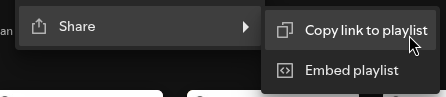
Paste the share link of the track, album, artist, or playlist you want to embed.
Apple Music
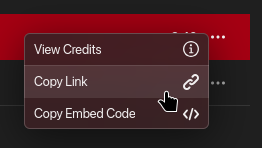
Paste the share link of the album, artist, or playlist you want to embed.
Last.fm
Paste your profile URL (e.g. https://www.last.fm/user/yourusername).
osu!
Paste your profile URL (e.g. https://osu.ppy.sh/users/yourusername).
Minecraft
Enter your Minecraft username.
Steam
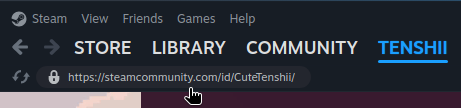
Paste your profile URL (e.g. https://steamcommunity.com/id/yourname).
Genshin Impact
Enter your UID, shown in the bottom-right corner of the screen while you're in-game (a 9-digit number).
Honkai: Star Rail
Enter your UID. Like Genshin Impact, it's shown in the bottom-right corner of the screen while you're in-game.
Roblox
Paste your profile URL (e.g. https://roblox.com/users/123456/profile).
Xbox
Enter your gamertag (e.g. Major Nelson). It's shown on your Xbox profile and in the Xbox app.
Modrinth
Paste the URL of any Modrinth page: a mod, server, texture pack, datapack, and more
(e.g. https://modrinth.com/mod/yourproject).
GitHub
For a profile card, paste your profile URL. For a repository card, paste the repository's URL.
Jellyfin
Jellyfin is self-hosted, so it needs a bit more setup than the other cards:
Create an API key and connect your self-hosted Jellyfin server.
Weather
Set the location you want to show the weather for.
Time
Set the timezone you want to display.
Location
Show a spot on a map. Enter an address, a place name, or GPS coordinates (latitude, longitude).
Text
Enter any custom text you'd like to show. The text supports Markdown, so you can add formatting like bold, italics, links, and lists.
Card rows Premium feature
Changing the number of rows on your card allows it to show more content than default.
For example, the AniList card shows your recent activity if you choose to show more than 2 rows.
Customizing your card
With a Premium account, you can toggle individual elements of a card on or off to better match your style.
Customize the look and feel of your cards by enabling or disabling certain elements.